CONVERSION FIELD NOTES · 19 OCTOBER 2026
PDF table to Markdown: check column order when cells wrap
A converted table can contain every word and still lose its column order. In this text-PDF test, the source starts a record with M17, but the output starts with Memory retention. The rest of that Topic cell lands after Checked. Match the row ID to the source before assigning each fragment to a column.
The failure below is a lost table structure and a reordered Topic cell, not a swapped numeric value. The converter kept M17, 24 and Checked together. It did not emit a Markdown table for the wrapped example. Treating the paragraph as four fields would therefore be unsafe.
The visible row and the extracted sequence disagree
This original, synthetic review queue has four columns: Row ID, Topic, Samples and Status. Horizontal rules define two records. In the harder file, Topic occupies two lines while the other cells are vertically centered in the same row.
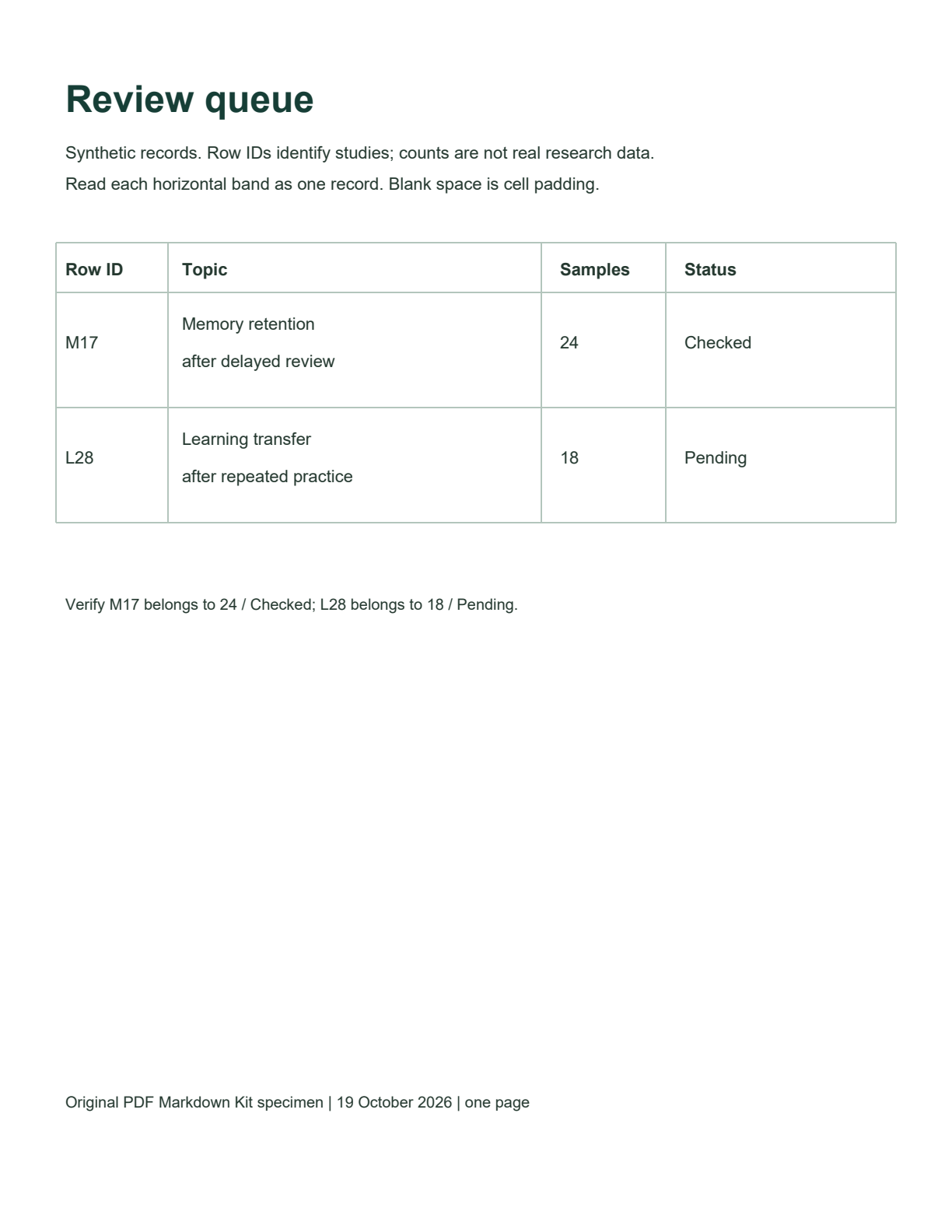
The actual first-record sequence was:
Memory retention M17 24 Checked after delayed reviewReading the source left to right gives M17 → Memory retention after delayed review → 24 → Checked. Reading the extracted paragraph gives the first Topic line, then the ID and two other cells, then the second Topic line. A line of readable text is not enough to identify column boundaries.
Test method: both one-page, selectable-text PDFs were converted separately through the production PDF Markdown Kit upload interface in desktop Chrome on 19 October 2026, using Auto. Neither result reported English OCR. The full results below were saved directly from the editable output without corrections. The regular comparison uses shorter, single-line Topic text; the IDs, counts, statuses and column positions are the same. It is an illustrative comparison, not a controlled accuracy benchmark.
Complete, unedited Markdown from both files
Single-line Topic comparison
The shorter cells produced a four-column Markdown table.
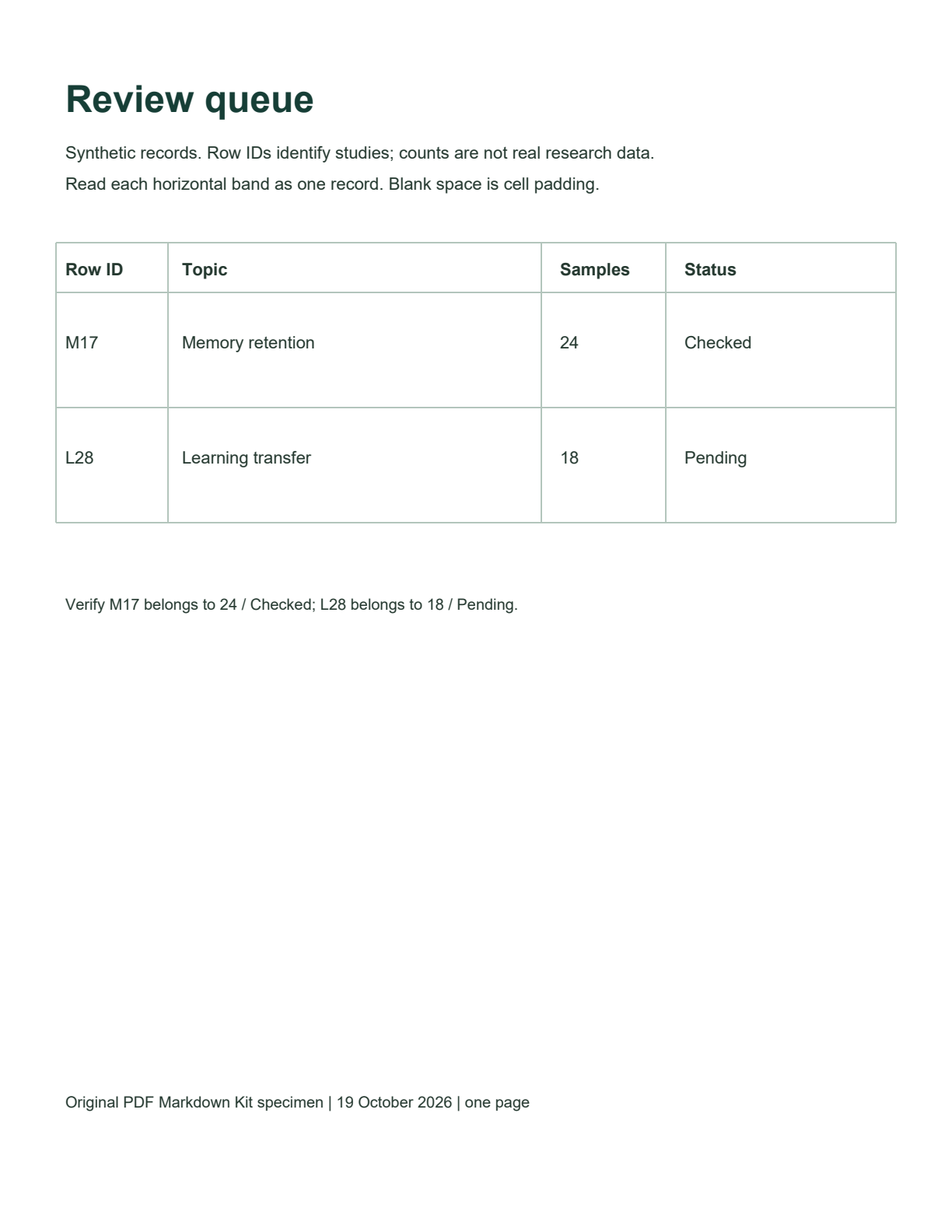
# Review queue

Synthetic records. Row IDs identify studies; counts are not real research data.

Read each horizontal band as one record. Blank space is cell padding.

| Row ID | Topic | Samples | Status |
| --- | --- | --- | --- |
| M17 | Memory retention | 24 | Checked |
| L28 | Learning transfer | 18 | Pending |

Verify M17 belongs to 24 / Checked; L28 belongs to 18 / Pending.

Original PDF Markdown Kit specimen | 19 October 2026 | one page
Wrapped Topic failure
The extended Topic cells were split around the other columns; table delimiters were absent.
Download raw failure output# Review queue
Synthetic records. Row IDs identify studies; counts are not real research data.
Read each horizontal band as one record. Blank space is cell padding.
Row ID Topic Samples Status
Memory retention M17 24 Checked after delayed review
Learning transfer L28 18 Pending after repeated practice
Verify M17 belongs to 24 / Checked; L28 belongs to 18 / Pending.
Original PDF Markdown Kit specimen | 19 October 2026 | one page
There is no claim here that the tool changed 24 into 18, or attached Checked to L28. Those errors did not occur in this run. The demonstrated problem is that the original four-column order is no longer represented in the Markdown.
Manual reconstruction: anchor each row, then join its Topic lines
The reconstruction below was written by hand after comparing the PDF. It is manual reconstruction, not converter output. It retains the source wording and joins the two lines of each Topic with a space.
| Row ID | Topic | Samples | Status |
| --- | --- | --- | --- |
| M17 | Memory retention after delayed review | 24 | Checked |
| L28 | Learning transfer after repeated practice | 18 | Pending |
| Source anchor | Keep in the same record | Repair in this result |
|---|---|---|
| M17 | Memory retention after delayed review; 24; Checked | Move “after delayed review” back next to “Memory retention” in Topic, then put the complete Topic after M17. |
| L28 | Learning transfer after repeated practice; 18; Pending | Join the Topic fragments and restore the four-column sequence beginning with L28. |
Why splitting the paragraph by spaces is not a repair
“Memory retention” already contains a space; “after delayed review” contains more. A whitespace split cannot tell which words share a cell. Nor can it know that Checked is a status rather than part of a Topic. Use the visible table borders and labels to determine ownership first. Add Markdown pipes only after each cell has a known row and column.
With the original page open, trace the horizontal band containing M17. Read all four cells in that band, including the lower Topic line. Repeat for L28. Do not pair fragments merely because they are adjacent in the extracted paragraph.
A row-level check before the table enters your notes
For this sample, a correct reconstruction must have exactly these two records:
M17→24→Checked, with the complete Memory retention Topic.L28→18→Pending, with the complete Learning transfer Topic.
Check the rendered Markdown as well as the raw text: it should show four headers and two data rows, with each complete Topic in one cell. Keep the source PDF attached to the note so the relationships remain auditable. If a source has an actually blank cell, verify that it is blank rather than shifting later values left to fill it.
To repeat this run, open the converter, choose one of the source PDFs and keep Auto selected. Compare the downloaded result with the full raw output above. The PNG files are previews of the source PDFs; they were not the inputs for these two conversions.
What this test does not establish
These are two synthetic English text PDFs on one desktop browser, each with one table and two data rows. This does not measure an error rate or establish performance on other tables. We did not test merged cells, rotated pages, cross-page tables, other languages or scans here. The shorter comparison and extended-cell example also differ in Topic wording, so the comparison does not isolate a universal cause.
The evidence shows a column-order failure in this particular wrapped-cell layout. It does not prove every wrapped table fails, or that forcing OCR would fix it. For the separate question of scan formatting, see the scanned-PDF before-and-after.