CONVERSION FIELD NOTES · 20 OCTOBER 2026
Choosing a PDF to Markdown converter: check the scanned pages too
For a PDF that mixes selectable text with scanned pages, a readable opening is not enough. In this original two-page test, all three web converters returned the first page's checkpoint. Only the PDF Markdown Kit result also contained the second page's checkpoint. Check a distinctive line from every page before trusting the Markdown.
There is no universal “best PDF to Markdown converter” result here. This is one small coverage test, on one English specimen, in desktop Chrome on 20 October 2026. We maintain PDF Markdown Kit, one of the tools tested. The complete outputs below include its formatting limitations as well as the other tools' missing second-page text.
One PDF with two different kinds of page
The fictional Cedar Lab handover has a selectable-text first page and an image-only second page. We generated the second page as a raster image and embedded it without an OCR text layer. Local PDF text extraction returned the first page's words and an empty string for the second page. The scan is clean, upright and typeset; it does not represent a photograph, handwriting or a damaged scan.
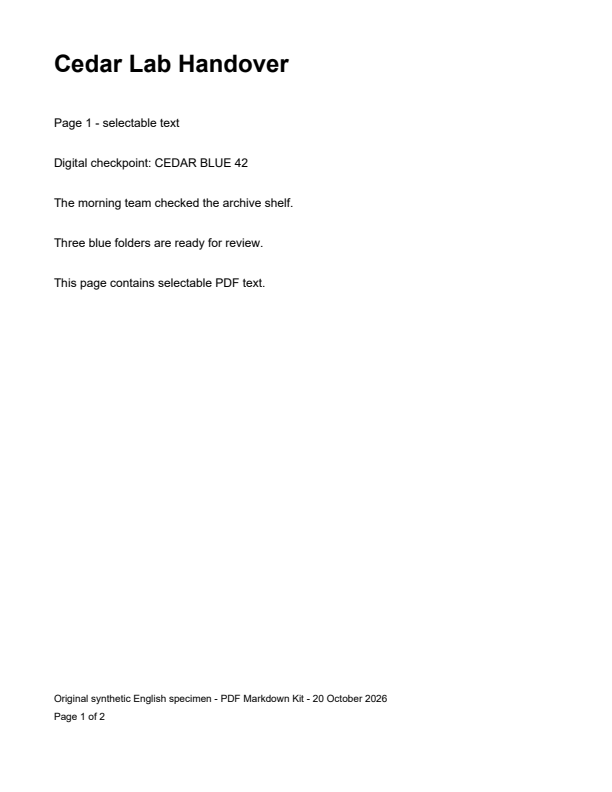
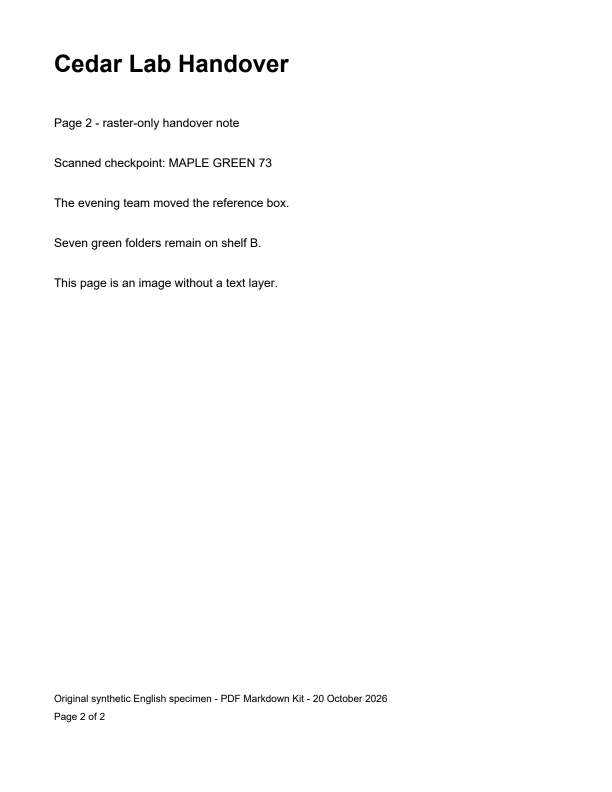
Source PDF SHA-256: e6a345602d61f47d81400c4dd23b12d7a20dcbda91e81574ad35c8b8d3f0caa8. The identical file was selected through each tool's upload control. No settings were tuned after seeing an output. No private documents or paid conversions were used.
What the three actual web runs returned
On a small screen, swipe the table horizontally to see both checkpoint columns.
| Tool and run | Page 1 checkpoint | Page 2 checkpoint |
|---|---|---|
| PDF Markdown Kit, Auto | Present | Present |
| pdf2md.morethan.io, default upload | Present | Absent |
| PDF.ai web tool, Convert to Markdown | Present | Absent |
- PDF Markdown Kit reported two pages processed and English OCR used on one page. Its second-page title is plain text, not a Markdown heading.
- pdf2md.morethan.io's Result/Edit view contained the first page and its footer only. It also joined the footer date directly to “Page 1 of 2”.
- PDF.ai's UI reported successful AI conversion, but its exported text contained only the first page. The processing engine was not independently verified.
“Present” means the exact checkpoint string appears in the complete raw output shown below. It is not an accuracy score. Neither absent output contained the second page's handover sentences or its page label, either. We did not test those tools' APIs, paid plans or alternative configurations. In particular, PDF.ai advertises AI and a PDF.js fallback; its success message does not prove which engine handled this run. This is not a standalone Marker benchmark.
The useful difference is within-file coverage: the first page gave a plausible result while the later raster page was missing from two returned files. That is a different check from comparing a wholly scanned PDF with a separate text PDF, or checking table column order. The result does not establish that mixed PDFs always fail in either service.
Complete, unedited Markdown from every run
These are the full text values saved directly from each tool's output editor, without cleanup. Line breaks and footer text are retained in the downloadable files. The display wraps long lines for small screens.
PDF Markdown Kit — Auto with English OCR
Download full raw Markdown# Cedar Lab Handover
Page 1 - selectable text
Digital checkpoint: CEDAR BLUE 42
The morning team checked the archive shelf.
Three blue folders are ready for review.
This page contains selectable PDF text.
Original synthetic English specimen - PDF Markdown Kit - 20 October 2026 Page 1 of 2
---
Cedar Lab Handover
Page 2 - raster-only handover note
Scanned checkpoint: MAPLE GREEN 73
The evening team moved the reference box.
Seven green folders remain on shelf B.
This page is an image without a text layer.
Original synthetic English specimen - PDF Markdown Kit - 20 October 2026 Page 2 of 2
pdf2md.morethan.io — default
Download full raw Markdown# Cedar Lab Handover
Page 1 - selectable text
Digital checkpoint: CEDAR BLUE 42
The morning team checked the archive shelf.
Three blue folders are ready for review.
This page contains selectable PDF text.
Original synthetic English specimen - PDF Markdown Kit - 20 October 2026Page 1 of 2
PDF.ai — web conversion
Download full raw Markdown
## Cedar Lab Handover
Page 1 - selectable text
Digital checkpoint: CEDAR BLUE 42
The morning team checked the archive shelf.
Three blue folders are ready for review.
This page contains selectable PDF text.
Original synthetic English specimen - PDF Markdown Kit - 20 October 2026
Page 1 of 2
Notice the limit in our own output: recognizing the scanned words did not recreate the second title's heading markup. Keeping page content and reconstructing document hierarchy are separate tasks. Repeated source footers also remain in this run.
Manual reconstruction: restore the missing page from the source
This example was written by hand after reading both original pages. It is manual reconstruction, not another converter output and not an automatic repair claim. It restores the second page's content, introduces explicit page headings and consolidates the repeated provenance footer. Preserve the raw file separately so those editorial changes remain visible.
# Cedar Lab Handover

## Page 1 - selectable text

Digital checkpoint: CEDAR BLUE 42

The morning team checked the archive shelf.
Three blue folders are ready for review.
This page contains selectable PDF text.

## Page 2 - raster-only handover note

Scanned checkpoint: MAPLE GREEN 73

The evening team moved the reference box.
Seven green folders remain on shelf B.
This page is an image without a text layer.

Original synthetic English specimen - PDF Markdown Kit - 20 October 2026
A page-coverage check before importing into notes or AI
- Open the original PDF and identify a distinctive line on each page. A repeating document title is not a useful checkpoint.
- Search the exported Markdown for those lines. Here, checking only CEDAR BLUE 42 would miss the omitted raster page; MAPLE GREEN 73 exposes it.
- If a page is absent, keep the original file and use an OCR-capable workflow for that page. Review its words against the source before combining results. Do not infer missing content from the first page.
- Save any repaired copy separately and label it manual reconstruction. Then check order, numbers, headings and repeated footers across the whole document.
To reproduce our run, open PDF Markdown Kit, select the downloadable two-page PDF, leave Auto selected and convert. Its conversion notes should report English OCR. Other services may change after this test date; compare your new full output rather than assuming the historical results still hold.
Limits of this comparison
This is one synthetic English PDF with two pages and one run per web tool. It is not a statistical sample, a speed test or a general ranking. We did not test other languages, blurred scans, hidden OCR layers, long mixed files, tables or formulas in this experiment. A checkpoint match alone does not prove every word is correct; inspect the full source and outputs. Our own converter currently OCRs English and returns plain OCR text, without exporting embedded image attachments.
For separate layout checks, read the scan-formatting experiment and the wrapped-table column-order experiment.